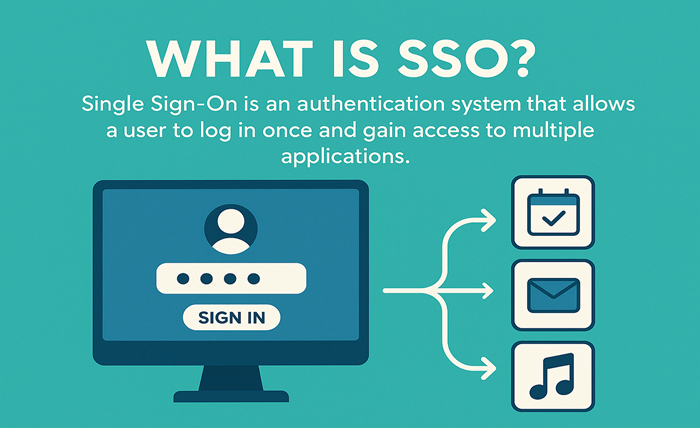
In today’s digital world, managing multiple usernames and passwords has become a daily challenge. Whether you’re accessing work applications, educational portals, banking services, or government platforms, keeping track of different login credentials can be frustrating and time-consuming. This is where Single Sign-On, commonly known as SSO, comes into the picture.
An SSO ID simplifies the login experience by allowing users to access multiple applications and services with a single set of credentials. Instead of remembering several usernames and passwords, users can sign in once and gain access to authorized platforms without repeated authentication.
This guide explains what an SSO ID is, how it works, its benefits, potential challenges, and why it has become an essential part of modern digital security.
Understanding SSO ID
SSO stands for Single Sign-On. An SSO ID is a unique digital identity that allows a user to authenticate once and access multiple connected applications or services without logging in repeatedly.
Think of it as a master key that opens several doors. Instead of carrying separate keys for each door, one key provides access to all the areas you are authorized to enter.
For example, an employee working in a company may use one SSO ID to access email, project management tools, communication platforms, payroll systems, and internal company resources. Similarly, students can use a single identity to access learning portals, online libraries, and academic resources.
The main purpose of SSO is to improve convenience while maintaining security.
How Does Single Sign-On Work?
Although the technology behind SSO can be complex, the user experience is quite simple.
Here’s a basic overview of how it works:
- A user enters their credentials on the login page.
- The authentication system verifies the identity.
- Once verified, a secure authentication token is generated.
- The token is shared with connected applications.
- The user can access authorized services without entering credentials again.
Instead of each application handling authentication separately, a central identity provider manages the verification process.
This streamlined approach saves time and reduces the need for multiple passwords.
Why Organizations Use SSO
Businesses, educational institutions, and government agencies often manage numerous digital systems. Without a unified authentication process, users would need separate credentials for every platform.
Organizations implement SSO to:
- Improve user experience
- Increase productivity
- Strengthen security controls
- Reduce password-related support requests
- Simplify user management
- Enable secure access across platforms
As digital ecosystems continue to expand, SSO has become a practical solution for managing access efficiently.
Key Benefits of Using an SSO ID
1. Fewer Passwords to Remember
One of the biggest advantages is convenience. Users only need to remember a single set of credentials instead of maintaining multiple passwords.
This reduces password fatigue and makes account management easier.
2. Faster Access to Applications
Repeatedly entering login details can slow down workflows. With SSO, users authenticate once and move between connected systems seamlessly.
This creates a smoother and more productive experience.
3. Improved Security
Many people reuse passwords across different platforms. If one account becomes compromised, multiple accounts may be at risk.
SSO helps organizations enforce stronger authentication policies, making access management more secure.
4. Reduced IT Support Costs
Password reset requests are among the most common issues handled by IT departments.
Since users manage fewer credentials, support teams spend less time resolving login-related problems.
5. Better User Experience
A simple login process encourages user engagement and satisfaction. Whether it’s employees, students, or customers, people appreciate quick and convenient access.
Common Examples of SSO in Daily Life
Many people use Single Sign-On without realizing it.
Some familiar examples include:
- Signing into multiple company tools with one workplace account
- Accessing various educational resources using a student portal
- Using a single account to access several connected business applications
- Logging into multiple services through one identity management platform
These systems are designed to reduce friction and simplify access across digital environments.
The Role of Identity Providers
An identity provider is a service responsible for authenticating users and managing digital identities.
When you log in through an SSO system, the identity provider verifies your credentials and confirms your authorization to access connected services.
Identity providers help organizations:
- Manage user accounts
- Enforce security policies
- Control access permissions
- Monitor authentication activities
- Support multi-factor authentication
Without an identity provider, Single Sign-On would not function effectively.
SSO and Security: What You Should Know
While SSO improves convenience, some users wonder whether it is secure.
The answer largely depends on implementation and security practices.
A properly configured SSO system can actually enhance security by centralizing authentication and reducing weak password habits.
However, because one account grants access to multiple services, protecting that account becomes extremely important.
Organizations often strengthen security through:
- Multi-factor authentication (MFA)
- Password complexity requirements
- Session monitoring
- Access controls
- Login activity tracking
Combining these measures with SSO creates a strong security framework.
What Is Multi-Factor Authentication?
Multi-factor authentication adds an extra layer of protection beyond a password.
Users may be required to provide:
- A one-time verification code
- A fingerprint scan
- Facial recognition
- A security key
- An authentication app approval
Even if a password is compromised, attackers cannot easily access the account without the additional verification step.
Many modern SSO systems integrate MFA as a standard security feature.
Difference Between SSO and Traditional Login Systems
Traditional login systems require separate authentication for each application.
For example:
- Email requires one password.
- Project software requires another.
- HR systems require a third.
With SSO, users authenticate once and gain access to all authorized systems.
Traditional Login
- Multiple usernames and passwords
- Frequent login prompts
- Higher risk of password reuse
- Increased support requests
Single Sign-On
- One set of credentials
- Seamless access
- Better user experience
- Centralized security management
This difference explains why many organizations are moving toward SSO-based authentication models.
When Would You Use an SSO ID Login?
A user may encounter an SSO ID login system in various environments, including workplaces, universities, government portals, healthcare systems, and enterprise software platforms.
Instead of creating separate accounts for every service, users authenticate through a centralized portal and gain access to all approved resources.
This approach is particularly useful when multiple applications are connected under the same organization or ecosystem.
Potential Challenges of SSO
Although SSO offers many advantages, it is not without challenges.
Single Point of Access
If an attacker gains access to a user’s credentials, multiple systems could become vulnerable.
This is why strong passwords and MFA are essential.
System Downtime
If the authentication service experiences technical issues, access to connected applications may be temporarily affected.
Organizations usually address this risk through redundancy and backup systems.
Initial Setup Complexity
Implementing SSO across multiple platforms requires planning, configuration, and ongoing maintenance.
Despite the setup effort, the long-term benefits often outweigh the challenges.
Best Practices for Using an SSO ID Safely
To maximize security, users should follow these recommendations:
Use Strong Passwords
Create passwords that are difficult to guess and avoid using personal information.
Enable Multi-Factor Authentication
Always activate MFA whenever available.
Monitor Account Activity
Review login history and report suspicious activity immediately.
Avoid Public Devices
Be cautious when accessing sensitive accounts from shared computers.
Sign Out When Necessary
Although SSO offers seamless access, logging out from devices you no longer use remains important.
The Future of Single Sign-On
As organizations continue adopting cloud services and digital platforms, Single Sign-On is expected to become even more widespread.
Future developments may include:
- Greater use of passwordless authentication
- Advanced biometric verification
- Artificial intelligence-driven security monitoring
- Improved identity management systems
- Enhanced user privacy protections
The goal remains the same: providing secure and convenient access to digital resources.
Frequently Asked Questions
Is an SSO ID the same as a username?
Not exactly. An SSO ID serves as a central identity that can provide access to multiple connected applications, while a traditional username may only work for a single service.
Is Single Sign-On safe?
Yes, when combined with strong security measures such as multi-factor authentication, encryption, and proper access controls.
Can one SSO account access multiple applications?
Yes. That is the primary purpose of Single Sign-On. Users authenticate once and access authorized services without repeated logins.
What happens if I forget my SSO password?
Most systems provide password recovery options through email verification, security questions, or administrator assistance.
Do small businesses use SSO?
Yes. While SSO is common in large enterprises, many small and medium-sized businesses also use it to simplify user management and improve security.
Conclusion
Single Sign-On has transformed the way users access digital services. By allowing one authentication process to unlock multiple applications, an SSO ID reduces password fatigue, improves productivity, and strengthens overall security.
For individuals, it offers a more convenient login experience. For organizations, it simplifies identity management and reduces administrative burdens. As technology continues to evolve, Single Sign-On will remain a key component of secure and efficient digital access.
Understanding how SSO works is an important step toward navigating today’s connected digital environment with greater confidence and convenience.