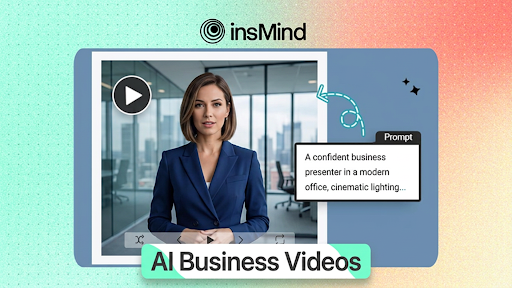
Every B2B team now needs video to compete. Product demos used to require a full production crew; brand stories lived in static decks; LinkedIn thought-leadership meant walls of text. In 2026, a single AI workspace collapses all of that into a prompt and a click.
This playbook covers how insMind’s AI explainer video platform handles the full corporate video pipeline—from scripted spokesperson clips to social-ready product teasers—and why forward-thinking teams are moving away from agencies for first-cut content production.
Here is what you will cover:
- Choosing between text-to-video and image-to-video for your campaign brief.
- Configuring the settings that actually affect output quality.
- Writing structured prompts that behave like condensed shot lists.
- Five high-ROI business use cases you can automate today.
Why B2B Teams Are Replacing Agencies with AI Explainer Tools
Traditional explainer video production runs $1,500–$10,000 per finished minute once you factor in scripting, voiceover, motion graphics, and revisions. Turnaround is measured in weeks, not hours, which makes real-time campaign testing impossible.
AI-generated video flips that equation. Iteration costs nothing. You can run ten prompt variations in the time a brief would take to reach a freelancer’s inbox. For teams that publish frequently—social ads, onboarding sequences, sales enablement clips—the compounding time savings are significant.
insMind’s platform bundles a corporate AI video maker, an image-to-video animator, and a broad model roster into one workspace. You do not need to switch tools depending on whether the brief calls for a scripted talking head or an animated product reveal.
Text-to-Video vs. Image-to-Video: Matching Mode to Campaign Goal
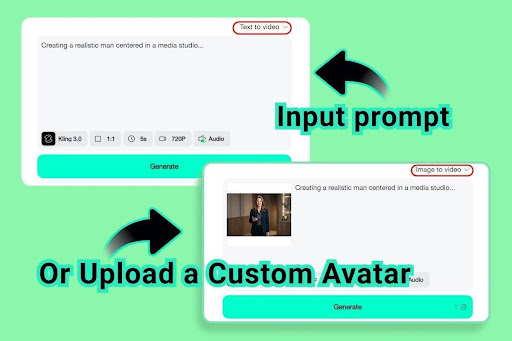
The two modes answer different briefs. Text-to-video is the right call when you are still developing the visual concept—you write the scene and the AI renders it from scratch. Image-to-video anchors motion to an existing asset: a product photo, a professional headshot, or a pre-approved brand render.
For most B2B campaigns, the decision is straightforward:
- Spokesperson or avatar content → image-to-video with a real portrait for consistent likeness.
- Conceptual or lifestyle B-roll → text-to-video for maximum creative flexibility.
- Product reveal from an existing photo → image-to-video to keep brand visuals intact.
Campaigns that blend both modes—voiceover-driven B-roll followed by a product demo—can generate each segment separately and combine them in any video editor. The generation step stays fast regardless.
For social advertising specifically, the same workflow doubles as an AI-driven influencer video tool and a UGC-style AI video creator—two formats that consistently outperform polished brand video on performance channels.
How to Create Business Explainer Videos with insMind
The production flow is deliberately short. Three decisions map directly to creative output.
Step 1: Choose your generation mode
Open the workspace and select Text to video or Image to video from the top-right dropdown. If you have a reference asset—a product photo, a headshot, a brand scene—choose image-to-video and upload it. If you are building from a script concept alone, text-to-video gives you the most flexibility.
Step 2: Configure model, ratio, duration, and audio
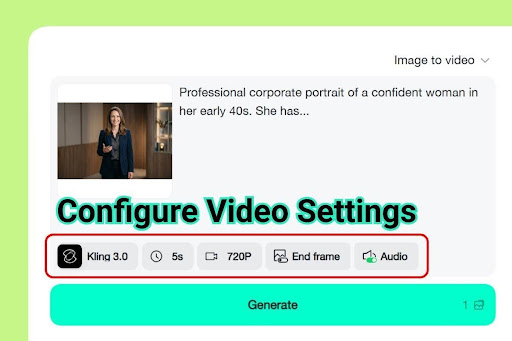
Use the settings bar below the prompt field to select your AI model, aspect ratio, clip duration, and audio toggle. For client-facing explainers, enable audio—models that synthesize voiceover and ambience feel significantly more polished than silent clips. Match aspect ratio to your distribution channel: 16:9 for YouTube and embedded web video, 9:16 for Instagram Reels and TikTok, 1:1 for LinkedIn feed.
Step 3: Generate and download your clip
Hit Generate. The progress bar advances as the model renders your clip. Preview in the built-in player. If the output hits your quality bar, click Download to save the MP4 at your chosen resolution. If it needs adjustment, edit the prompt or settings and regenerate—each iteration adds only seconds to the process.
Model, Ratio, and Audio: Settings That Move the Needle
Model selection is the single biggest lever on output quality. Flagship-tier models handle complex subject descriptions and nuanced lighting instructions better than baseline options. For any content going in front of clients or external audiences, the quality delta justifies using a higher-tier model.
Aspect ratio is a creative decision as much as a technical one. A 16:9 frame allows context and environmental storytelling. A 9:16 vertical forces the subject forward and works well for spokesperson formats on short-form platforms.
Audio-enabled models are worth the additional generation time for client-facing content. A clip that integrates voice, music, and ambient sound reads as a finished asset rather than a draft—which matters when the output goes directly into a pitch deck or sales sequence.
Prompt Blueprint for Corporate and Brand Video
Generic prompts produce generic results. “Professional business video” is a description, not a brief. Structure your prompts using this framework:
- Subject: [Professional title + brief appearance note, e.g. “confident woman in her early 40s, navy blazer, direct eye contact”]
- Setting: [Environment, e.g. “modern glass-walled conference room, natural morning light”]
- Action: [What the subject does or what happens—keep it to one primary action]
- Camera: [Shot type and movement, e.g. “medium close-up, slow push-in”]
- Audio: [Tone and instrumentation, e.g. “confident voiceover, minimal piano underscore”]
For product-first explainers, lead with the product in the subject line and add a camera move that reveals it progressively. Avoid stacking multiple simultaneous actions—the model handles one well, two adequately, three rarely.
Five Business Use Cases Worth Automating Today
- Product demos — Show the product within the first two seconds. Keep the environment clean and lighting consistent with your brand palette.
- Onboarding and training — Text-to-video handles animated walkthroughs and screen-overlay explainers without requiring screen-recording software.
- Investor and pitch clips — A thirty-second AI video embedded in a deck increases perceived production value and keeps stakeholders engaged through dense data sections.
- Social proof and testimonial-style content — Animate a written customer quote by placing it in a lifestyle scene with an image-to-video spokesperson.
- Sales enablement personalization — Sales teams can generate personalized intro clips using image-to-video with a prospect’s company logo or product screenshot as the anchor image.
Frequently Asked Questions
Do I need video editing skills to use an AI explainer video generator?
No. insMind’s workflow is click-through: select mode, adjust settings, write a prompt, generate, download. No timeline editor, no codec knowledge, no rendering software.
Which mode works better for B2B versus B2C video?
B2B content almost always benefits from image-to-video when you need consistent brand representation—especially for spokesperson formats where likeness and professional tone are non-negotiable. B2C lifestyle and product content often has more flexibility, making text-to-video viable.
Can AI-generated explainer video be used for paid advertising?
Yes. The major ad networks—Meta, Google, LinkedIn—accept AI-generated video. Check current platform disclosure requirements and comply where mandated. Most platforms require a label rather than prohibiting the content.
What duration works best for business explainer content?
Ten to sixty seconds covers the majority of formats. For social and pre-roll ads, fifteen to thirty seconds is the proven retention window. For embedded product demos and onboarding clips, thirty to sixty seconds allows enough time to demonstrate a workflow.
What image format works best for image-to-video?
JPEG and PNG are both accepted. Portrait orientation or square crops work best for spokesperson content. For product images, center the subject in frame with adequate negative space around it.
Build Your First Business Explainer Today
The best AI explainer video generator for business in 2026 is the one your team will actually use. insMind keeps the workflow short enough that generating a first-cut video takes less time than briefing a contractor.
Pick a mode, write a structured prompt, configure model and audio, and hit Generate. Your next client-ready explainer is one session away.